SimplePDF now available in Google Chrome Browsers!
SimplePDF, an in-browser PDF editor is now available to all Westside employees via your Google Chrome toolbar.
What is SimplePDF?
What is SimplePDF?
SimplePDF is a secure, HIPAA compliant PDF editor that you can use to:
- Complete PDF forms
- Add text
- Add pictures
- Add a drawn signature
- Re-Organize or delete pages of a PDF document
How do I use SimplePDF?
- Ensure you are signed into Google Chrome with your Westside Google account (Remember, signing in with your Westside account is mandatory per IT Policy!)
- The SimplePDF Chrome extension can be found on your toolbar, pinned to the right of your address bar.
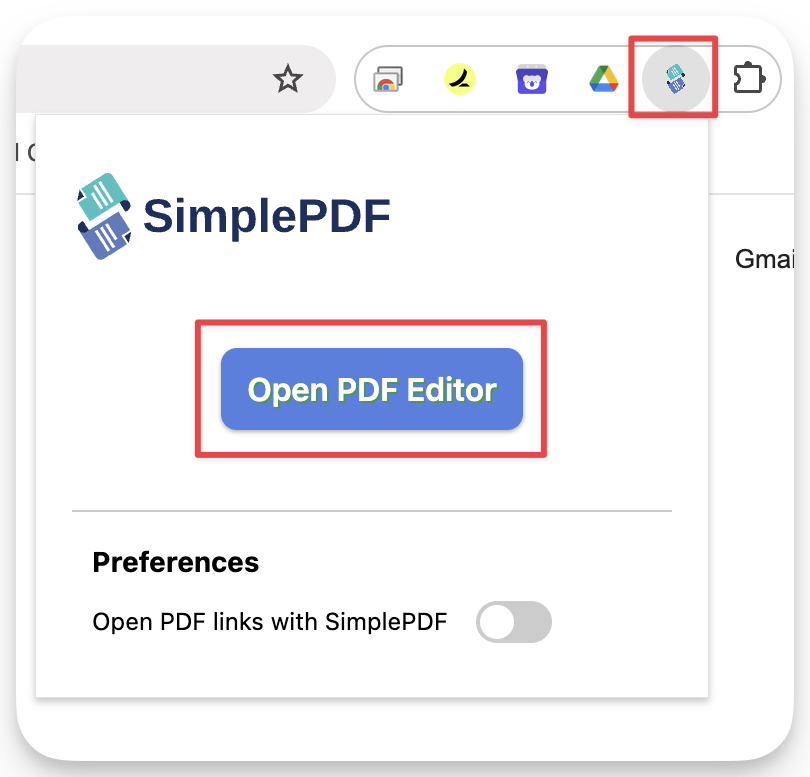
- Clicking the icon will launch the application in-browser where you can open a PDF via your downloads or file on your device.
How is SimplePDF HIPAA Compliant?
PDFs are never uploaded to the cloud or a server online - all PDFs are processed and opened locally on your device, within Google Chrome. Data is never transferred to SimplePDF.
Recent Topics
New Process: RBT Supervision Reports
Westside has introduced new digital RBT Supervision Reports to help track Direct and Supervision hours within the app. This means that RBTs and BCBAs will no longer need to keep these records manually. The use of this new tool is mandatory, and it willRESOLVED: 8x8: Incoming SMS messages not being received
We’ve received multiple reports of incoming SMS text messages not being received in 8x8. We’ve already reached out to 8x8 support, and we’re collaborating with them to resolve the issue. Unfortunately, there’s no workaround available at this time. We’llSimplePDF now available in Google Chrome Browsers!
SimplePDF, an in-browser PDF editor is now available to all Westside employees via your Google Chrome toolbar. What is SimplePDF? SimplePDF is a secure, HIPAA compliant PDF editor that you can use to: Complete PDF forms Add text Add pictures Add a drawn4/16/25: Xerox Printer Scanning Fix
Due to recent changes made by Google, enhanced security features are now active on the account we use for scanning documents. As a result, the scan-to-email feature is broken until a few changes are made within the printer's web console at each clinic.CentralReach log-In issues
Issue: Users report that attempts to log into CentralReach are unsuccessful and the page reloads without advancing. Fix: Delete your saved Google Chrome browser cache and cookies. In the Google Chrome URL bar, copy and paste the following and submit: